Real screens
These are the actual pages.
Real views inside the Business Hub, filled with sample data you clear in one click after setup.
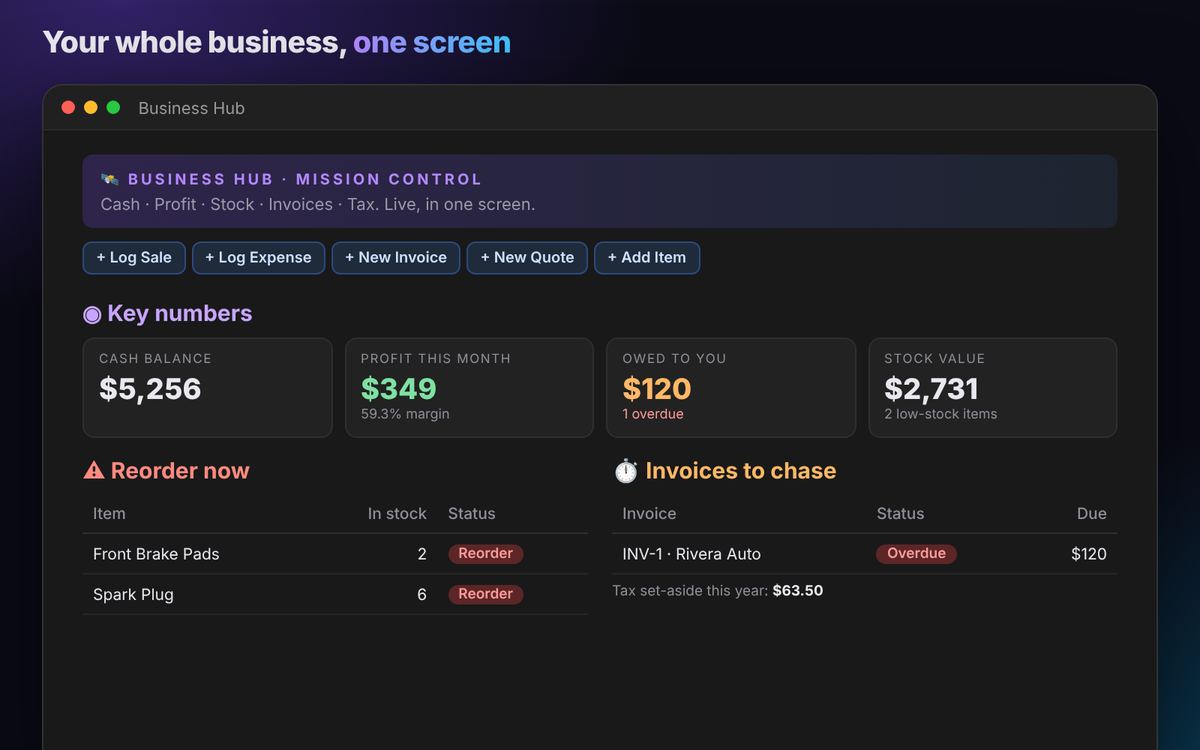
Sales, expenses, invoices and inventory in one Notion system that does the math for you. See your cash, your real profit and what you're owed in five seconds.
| Item | In stock | Status |
|---|---|---|
| Front Brake Pads | 2 | Reorder |
| Spark Plug | 6 | Reorder |
| Invoice | Status | Due |
|---|---|---|
| INV-1 · Rivera Auto | Overdue | $120 |
Receipts in a drawer and deductions you never claim.
"I think there are 3 left" turns into a sale you can't fill.
Invoices nobody chases while the cash sits with your clients.
Platform fees and shipping quietly eating your margin.
This is how the Hub works. Click the button to sell a $549 watch (it cost $380 plus $25 in extra costs) and watch cash, profit and stock change on their own.
Click a quick-action button: Log Sale, Log Expense, New Invoice.
Type the amount, pick the item or client.
Done. Dashboard, stock and tax totals update themselves.
New in version 1.3: monthly budgets and a cash forecast, returns & refunds, time tracking for freelancers, and goals with a yearly report.
Set a monthly budget per category and watch the bar fill. See how much cash you'll have in 30, 60 and 90 days, after bills and incoming invoices.
Track every return from request to refund. Restocked items go back into inventory and refunds come off your cash and profit automatically.
Log hours per client and project, hourly or fixed price. See hours against budget and exactly how much you still have to invoice.
Set sales, profit or spending goals with live progress bars. At year end, one printable page has everything your accountant asks for.
Cash balance, profit and margin this month, money owed and stock value at the top of one screen.
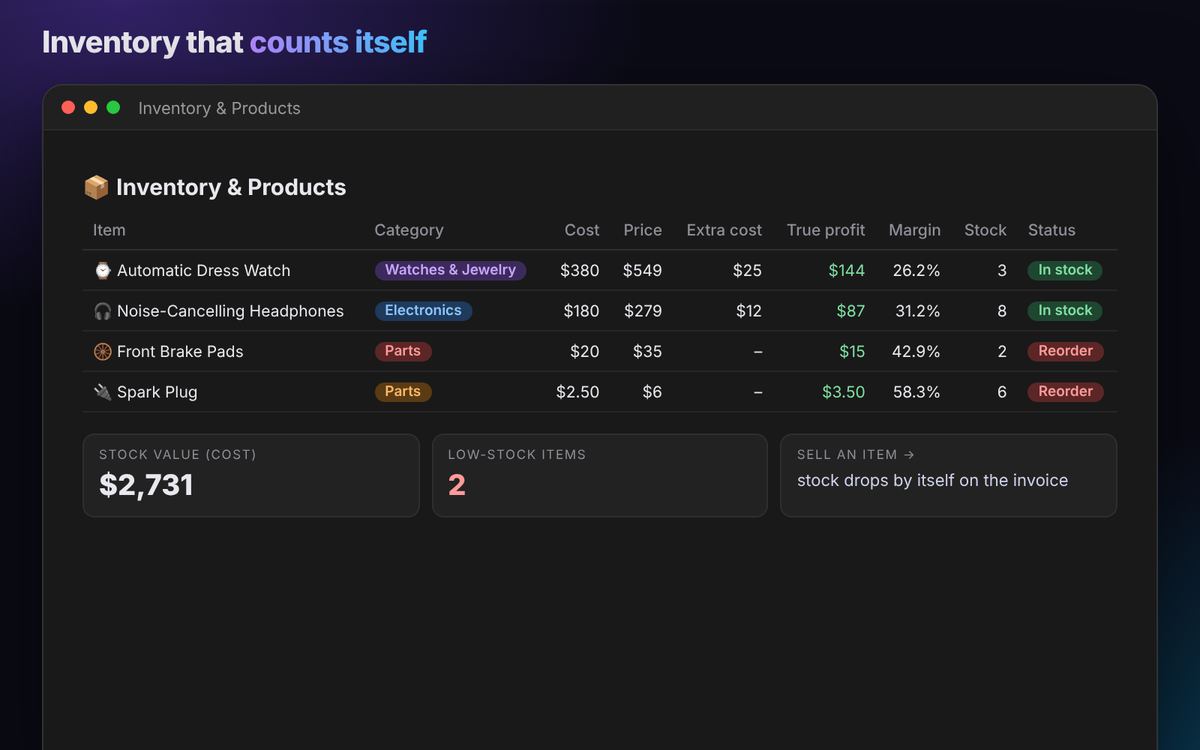
Issue an invoice and stock goes down. Reorder alerts tell you what to buy before you run out.
Price minus cost minus shipping, platform fees and authentication. Know what each piece really earns.
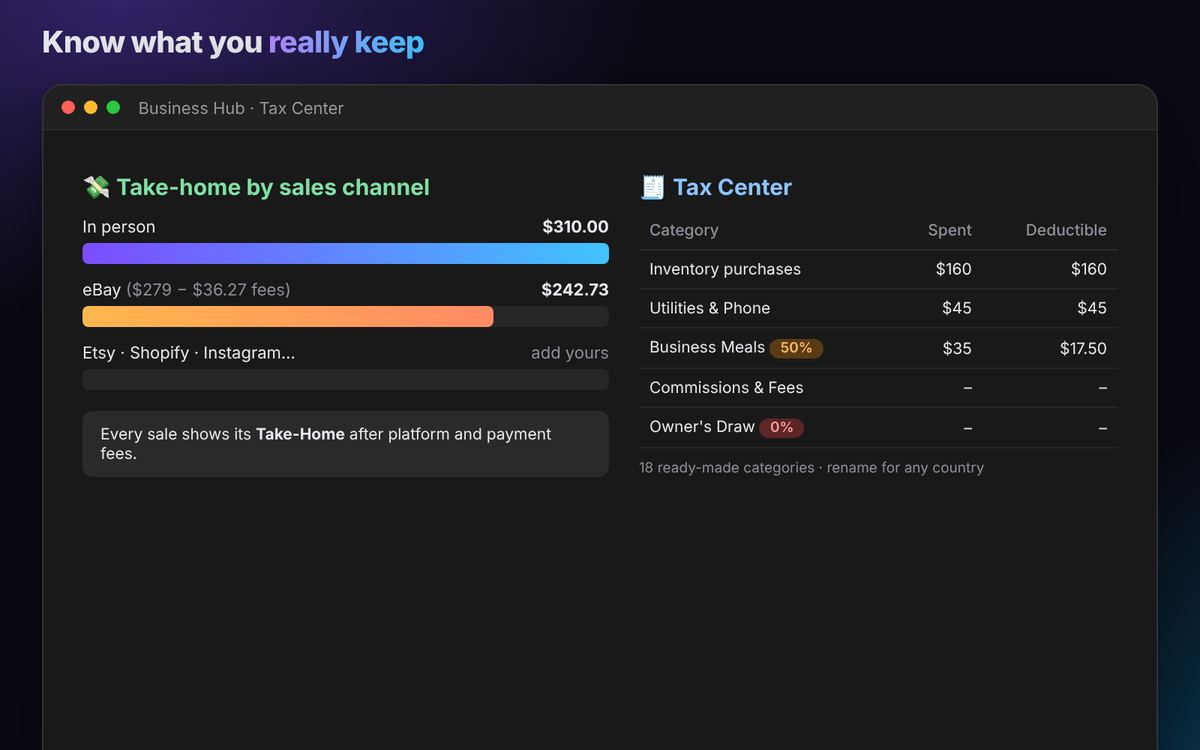
eBay, Etsy, Shopify, Amazon, Instagram or in person: see what you keep after fees on each.
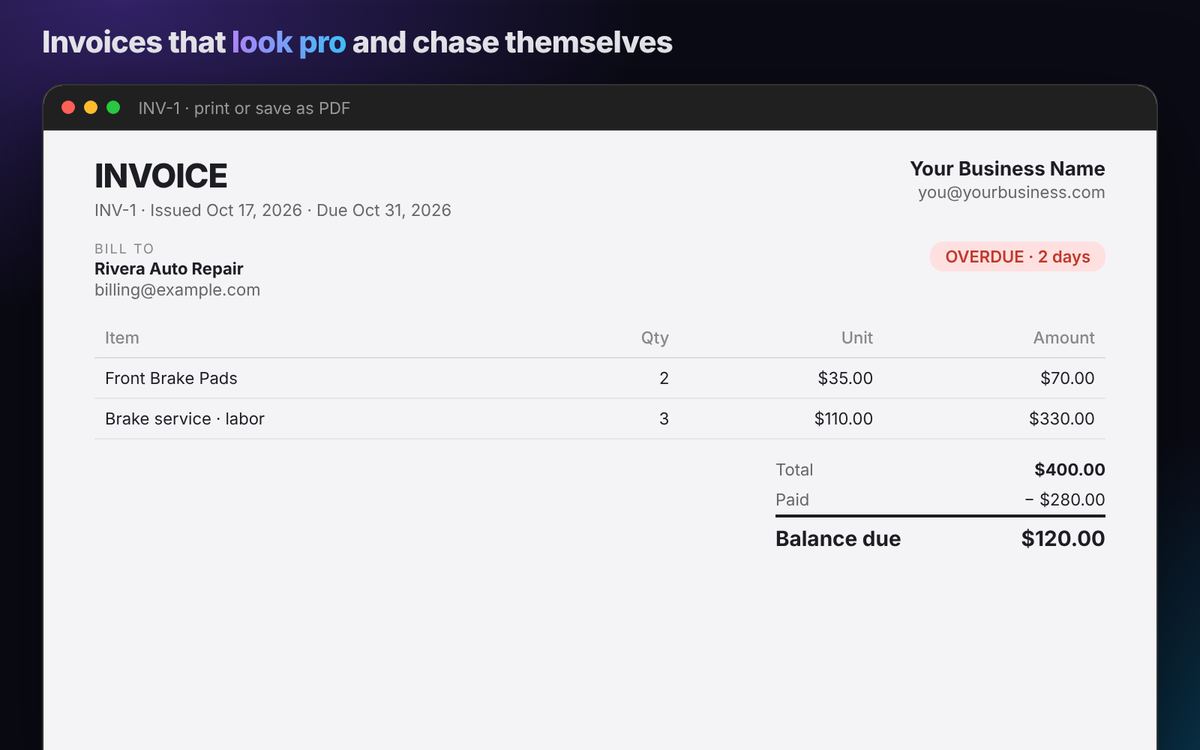
Quote → invoice in one click. Overdue flags itself. Print or save as PDF with a clean totals block.
18 ready-made expense categories with deductible amounts and a running tax set-aside estimate.
Who you buy from, lead times and terms. Every tool you pay for, with renewal alerts.
Quick-action buttons and mobile forms. Snap a receipt photo and you're done.
Enter your cost, the platform's fees and the margin you want. Get your break-even price, a recommended price and the profit you'll keep.
Track every order from To pack to Delivered, with carrier, tracking number and a red flag when it's late.
Every lead from first message to Won, with deal value and a reminder on the day you need to follow up.
Rent, suppliers, tax. See what's due this week and what's overdue before it costs you.
Stock sitting 30+ days turns yellow and 90+ days turns red, so you know what to discount or bundle.
One list on your dashboard: orders to ship, people to call, bills due and stock that isn't moving.
| Item | In stock | Status |
|---|---|---|
| Front Brake Pads | 2 | Reorder |
| Spark Plug | 6 | Reorder |
| Invoice | Status | Due |
|---|---|---|
| INV-1 · Rivera Auto | Overdue | $120 |
| Item | Category | Cost | Price | Extra cost | True profit | Margin | Stock | Status |
|---|---|---|---|---|---|---|---|---|
| ⌚ Automatic Dress Watch | Watches & Jewelry | $380 | $549 | $25 | $144 | 26.2% | 3 | In stock |
| 🎧 Noise-Cancelling Headphones | Electronics | $180 | $279 | $12 | $87 | 31.2% | 8 | In stock |
| 🛞 Front Brake Pads | Parts | $20 | $35 | – | $15 | 42.9% | 2 | Reorder |
| 🔌 Spark Plug | Parts | $2.50 | $6 | – | $3.50 | 58.3% | 6 | Reorder |
| Category | Spent | Deductible |
|---|---|---|
| Inventory purchases | $160 | $160 |
| Utilities & Phone | $45 | $45 |
| Business Meals 50% | $35 | $17.50 |
| Commissions & Fees | – | – |
| Owner's Draw 0% | – | – |
| Item | Qty | Unit | Amount |
|---|---|---|---|
| Front Brake Pads | 2 | $35.00 | $70.00 |
| Brake service · labor | 3 | $110.00 | $330.00 |
| Item | Platform | Bought | Sold | Fees | Ship | Profit | ROI | Verdict |
|---|---|---|---|---|---|---|---|---|
| Sneakers | StockX / GOAT | $140 | $260 | $26 | $14 | $75 | 53.6% | 🟢 Good flip |
| Watch | Facebook / Local | $380 | $549 | $0 | $0 | $144 | 37.9% | 🟢 Good flip |
| Vintage jacket | eBay | $25 | $48 | $6.24 | $9 | $4.76 | 19% | 🟡 Thin margin |
| Item | Total cost | Fees | Goal | Break-even | Recommended | Profit | Verdict |
|---|---|---|---|---|---|---|---|
| Designer bag · eBay | $145.40 | 13% | 30% | $167.13 | $255.99 | $77.31 | 🟢 Healthy |
| Handmade candle · Etsy | $8.95 | 9.5% | 40% | $9.89 | $17.99 | $7.33 | 🟢 Healthy |
| Sneakers · testing $175 | $160.00 | 12% | 30% | $181.82 | $275.99 | −$6.00 | 🔴 Losing money |
| Headphones · eBay | To pack | 🟠 Ship today |
| Jordan Smith | Quote sent | 🔔 Today |
| Maya's Boutique | Lead | In 2 days |
| Quarterly sales tax | $210 | 🔴 Overdue |
| Shop rent | $650 | 🟠 In 3 days |
| Headphones | 8 left | 🔴 110 days |
| Spark plugs | 6 left | 🟡 74 days |
Previews use the template's sample data. You replace it with yours in minutes.
Real views inside the Business Hub, filled with sample data you clear in one click after setup.
Watches, sneakers, bags, electronics. Margin and stock on every piece.
Etsy, Shopify, eBay, Amazon, Instagram. One place for orders and profit.
Quotes, invoices and who still owes you, on one screen.
Brand deals, gear and deductible expenses, tracked like a business.
Buy in bulk, sell on, with stock value always up to date.
Contractors, salons, studios, repair shops. Quote, invoice, restock.
Most Notion templates do one job: an inventory list, an invoice tracker or a CRM. The Business Hub connects them, so one sale updates your stock, profit and tax totals at once.
| Business Hub | Single-purpose templates | Monthly accounting apps | |
|---|---|---|---|
| Inventory with true profit per item | ✓ | Some | Often a higher plan |
| Price Planner: break-even and recommended price | ✓ | Separate template | Rarely |
| Take-home after fees, by sales channel | ✓ | No | Some |
| Invoices and quotes that flag overdue | ✓ | Separate template | ✓ |
| Orders to ship with tracking | ✓ | Some | Some |
| Lead pipeline and follow-up reminders | ✓ | Separate CRM | Rarely |
| Monthly budgets and a 90-day cash forecast | ✓ | No | Higher plans |
| Returns that restock and adjust profit | ✓ | No | Some |
| Time tracking and money still to invoice | ✓ | Separate template | Add-on |
| Goals and a yearly tax report | ✓ | Some | Some |
| Bills to pay and tax categories | ✓ | Some | ✓ |
| Price | $39 once | $4–$29 each | Every month |
Most accounting apps charge every month. The Business Hub is yours for a single payment.
The Hub isn't a replacement for an accountant. It keeps your records organized so tax time is quick.
No. Everything works on Notion's free plan, on computer and phone. Notion's free plan shows one chart per workspace, so extra charts show an upgrade note; every number, table and alert still works.
Instantly. You'll see a button right after payment and get the same link by email. Click it, press Duplicate, and the Hub appears in your Notion. A step-by-step walkthrough is on our Help page.
Yes. The Start Here guide walks you through setup in about 15 minutes. Day to day, you click a button and type an amount.
Yes. Change the currency in a few clicks and rename the tax categories to match your country.
No. You log transactions yourself, which takes seconds with the quick-action buttons and mobile forms.
Yes. Each invoice is laid out to print or save as a PDF, or you can share it as a link.
Yes. Every purchase comes with a 14-day guarantee: if the Hub doesn't work as described, or you're not happy with it, email us within 14 days of purchase and we'll refund you in full — see our Refund Policy.
Get the Business Hub, set it up in 15 minutes, and see your whole business in one screen.
Use these free, then get everything in one dashboard with the Business Hub.
Checkout opens soon. Join the launch list and get 20% off: $31.20 instead of $39. We'll email you the moment it's live.
One email at launch, no spam.Watch your inbox: your 20% launch code arrives as soon as checkout opens.